|
Starlight Site Operating Manual | Setting up and managing Sub-Domains:
A sub-domain is one which resides
under your top-level domain name, but in many ways behaves as a totally
independent domain. You'll observe that many of the larger corporations
use these, as they're somewhat more professional-looking, and do a better
job of creating an independent presence for service or product lines,
which appear as separate web entities. Thanks to C-Panel, this task
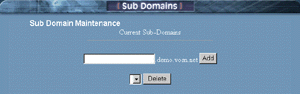
has been made easier than ever and can be achieved as follows: Yes, you'll observe duplicates of all "configured pop email accounts" appearing beside the sub-domain, and or all sub-domains you've created. Now I know you'll be tempted to use (what appears to be) a perfectly good email address, BUT please "Don't!" This is a feature that is in final development. While it may look somewhat confusing at first glance, it's really not. In the near future, you'll be able to configure these email accounts for use with your sub-domains. For example, if you configured support.yourdomain.com, then you'll be able to use the address tom@support.yourdomain.com. For the time being, please configure email addresses that correspond to your standard "top-level" domain, and just ignore the sub-domain duplicates. ALSO: Any duplicate sub-domain email addresses you see appearing in your pop mail setup configuration DO NOT count towards your allocated number of pop mail boxes we've provided.
|