|
Starlight Site Operating
Manual | CGI
and SSI:
Where
to place your CGI scripts:
Although there is nothing dangerous about placing cgi scripts in random
directories throughout your site, it's best if you keep them in their
own little home known as the cgi-bin. This minimizes security risks
and allows you to maintain your cgi programs from one directory.
The path to Perl:
One of the first things you must do when configuring a script, is set
the correct path to the Perl interpreter, which is the engine responsible
for processing the script. The path to Perl on our servers is: #!/usr/bin/perl
The path to
Sendmail:
Some programs, such as the ones which send email, will need to know
where the Sendmail program resides on the server. The script will typically
have a setting like this: $mailprog = '/usr/sbin/sendmail'; and will
want you to set it appropriately. Sendmail on our servers can be found
here: /usr/sbin/sendmail or /usr/lib/sendmail.
Setting
directories within your cgi scripts:
When you configure a cgi script for "any" server, it may ask
you to set variables such as the base, relative, and CGI directory/url
settings. Here's an "example" using Matt Wright's wwwboard.pl
script. Obviously, each script may vary, but this should provide you
with some basic idea:
$basedir = "/home/yourlogin/public_html/wwwboard";
$baseurl = "http://www.yoursite.com/wwwboard";
$cgi_url = "http://www.yoursite.com/cgi-bin/wwwboard.pl";
Most scripts come with documentation on how to set these directories.
Please make sure you read and understand it before configuring the script.
New to cgi? Here is a page with questions and answers to numerous questions
evolving around the inns and outs of using cgi within your scripts:
http://www.w3.org/Security/Faq/www-security-faq.html
Another excellent site, which provides step by step chapters is: http://www.cgi101.com/class/
Understanding
File Permissions:
There are a number of file permissions, which can be used for a variety
of different purposes, however we'll limit this tutorial to the ones
most commonly used. To begin with, it's important you understand the
three categories of permissions, which are:
Owner Permissions:
The owner is you. In most cases, this is not so much of a concern, as
you can only obtain owner permissions in one of two ways. 1. FTP into
your account using your Username and Password. 2. Login via Telnet with
the same information.
Group Permissions:
The represents a group of users who have access to a particular directory.
For example, a password protected directory, whereas only members can
access it upon providing the correct Username and Password. In this
case, any permissions you assign to "Group" would be applicable
to users with access to that particular directory.
Public Permissions:
This is the most important one of all. Public permissions determine
what your world wide visitors can and cannot do with your files. ALWAYS
make sure you understand what a particular permission does before assigning
it to a file. If not, you may wakeup to find your website demolished
by some clown who was snooping about and gained access to your files.
Setting
File Permissions:
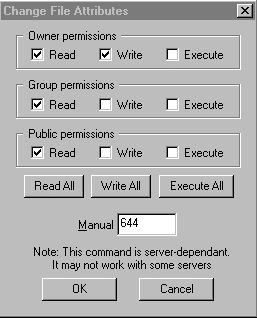
To set file permissions:
1.
Login with your FTP client
2. Open the directory
where the file you wish to set permissions on resides
3. Right click on the
file and select CHMOD
A box similar to the one above will appear
Observe how you can "select"
the individual permissions you want, or simply enter the 3 digit number
if you know what it is. Most instructions included with downloaded scripts
will tell indicate this to you.
By default, all files uploaded to the server
automatically have permissions set to 644. The setting 644 is relatively
safe, as it provides "Read" and "Write" access to
the owner, while limiting the rest of the public to "Read Only"
access.
When setting permissions for cgi scripts, the most common permissions
setting is 755. 755 allows the owner "Read and Write"
access, while allowing the Group and Public "Read and Execute"
permissions. So what are we actually saying? In short, when users access
your cgi script, the server has been instructed to grant them permissions
to "Read and Execute" it. Sound scary? It's not actually…
Remember that a script is a program that must be processed by the server.
As long as the script is written properly, you can safely allow users
to execute it, and thus providing the desired results. For example,
if they wanted to post a message to your wwwboard discussion forum,
then they would need these permissions to execute wwwboard.pl, which
would write their new message to an html file, which is displayed on
the main forum. The new message would reside in a directory on
your site so other users could view it. Most cgi, perl and other
scripts you'll be installing come complete with instructions telling
you which permissions you'll need to set them to.
WARNING!
Setting permissions on files is a relatively simple task, however MAKE
SURE you fully understand what it is you're allowing the public to do
with your files. For example, some less experienced users often make
the fatal mistake of simply setting ALL of their files to 777. While
777 will automatically allow executing privileges, it also allows full
"READ, WRITE, and EXECUTION ability to the entire world!!!!
This is how web sites get hacked! While most visitors have good intentions,
all it takes is one person whom snoops about your files seeking an "Open
Back Door." This could result is them gaining full access to your
directories, which means they can do anything from deleting your entire
site, to defacing it with obscenities.
New to cgi? Here is a page with questions and answers to numerous questions
evolving around the inns and outs of using cgi within your scripts:
http://www.w3.org/Security/Faq/www-security-faq.html
Using Server Side Includes
- SSI
SSI works in conjunction with a web page usually with the .shtml extension.
The .shtml extension tells the server to do something different with
the web page. When you append the .html or .htm extension, this tells
the server to "read" the page only. The .shtml extension tells
the server to "Execute" the page, in addition to just reading
it.
So, why would you want to execute the page? There are various commands
you can program into a web page, which the server will look for and
parse when the file is called as .shtml. In many cases, this mode is
used in conjunction with Server Side Include (SSI) tags, to call a CGI
script. For example, you have a visitor counter script, and we'll call
it count.cgi. Every time someone visits your website, you want the script
to be called, so that it logs the visitor into a file.
To do this, you would place an SSI tag into your web page. The tag in
this case, would look something like:
<!--#exec cgi="/cgi-bin/count.cgi" -->
This small tag, which is hidden in the html coding of your page is telling
the server to:
1. Go to the cgi-bin
2. Execute count.cgi
That's it! The information has been captured and processed by the count.cgi
script. Of course, that's the short version of what happens. The long
version would no doubt, would take us far beyond the scope of this document.
PLEASE do not use the .shtml extension on "all" of your web
pages unless it's absolutely necessary. With a busy web site, this means
that every page must be executed, as opposed to just read. This as you
can appreciate, can add considerable memory and CPU load to the system.
As always, read the instructions that came with your script carefully.
They should provide specific instructions on how to configure
the script, as well as the SSI tag.

|