|
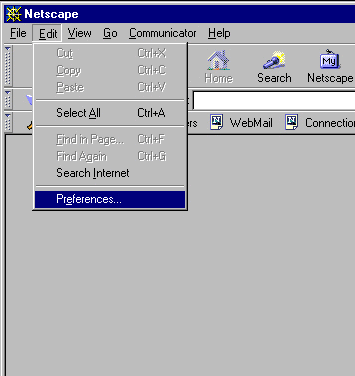
1. Open Netscape Browser 2. Move to the "Edit" drop down menu and select "Preferences."
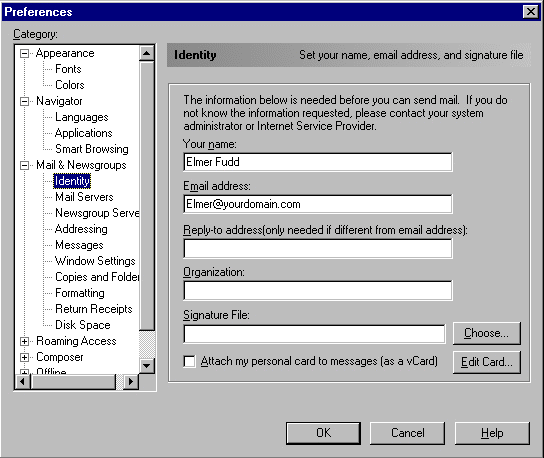
3. From the "Left Menu" select "Mail and Newsgroups", then click the + symbol, which displays a list of options. Select "Identity." Enter the "email address" of the account you're setting up, and "your name" as demonstrated in the following example:
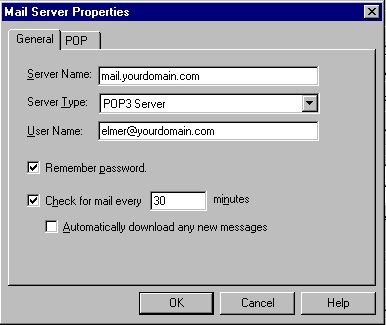
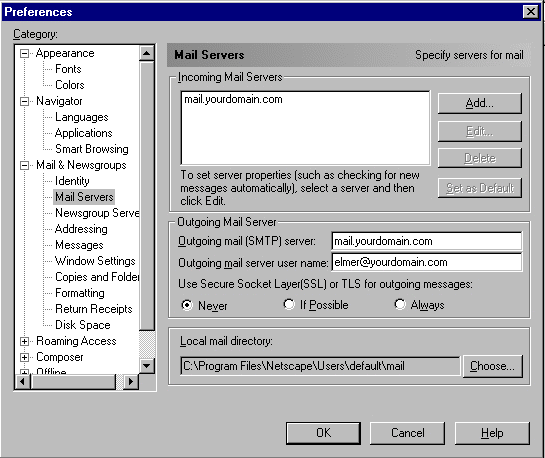
4. From the "Left Menu", select the "Mail Servers" tab and enter your appropriate information as illustrated in the following example. Make sure to use the "full Email Address" of the account you're setting up as the "username." When finished, click "ok."
5. Configure your "Outgoing Mail Server", settings that correspond to your domain name, and as demonstrated in the following example. Click "OK" when finished.
That's pretty well it! Close your account settings and test out your new address by sending a message to it. If you're able to send a message, and receive that same message in your new account, then congratulations! - you've successfully setup your first email account on our servers.
Potential
problems with sending mail: 1. Change the "SMTP Outgoing Mail Server" settings to the same ones as you're using on your ISP's email account. This information should be included with the setup instructions of your Internet account. If not, contact your ISP for their "Outgoing SMTP Mail Settings." 2. Once you've added your ISP's SMTP settings, remove the information in the "Outgoing Mail Server User Name" and leave it blank. DO NOT CHANGE ANYTHING ELSE! You can now receive mail from your domain account, while sending mail will be accomplished through your ISP's SMTP servers. This will in no way affect the performance or look of your email messages coming from your domain. Note: PLEASE… DO NOT send large volumes of mailings through our SMTP Relay server. It's really provided as a courtesy to our users, and not something to be used for mass mailing list purposes. If you're sending large emails, or are running a mailing list, PLEASE use your ISP's mail server for this purpose. They are better setup for this sort of heavy duty usage, and you won't clog our SMTP server, which also needs to provide resources to other users.
All
logos and trademarks in this document are property of their respective
owner. |